Private assistant workspace
Run internal models, use tool-enabled answers, share read-only conversations, and preserve retrieval and metadata context.
 Pulsar
 Spaceport Consulting
Private deployment, full AI workspace
Pulsar brings private chat, scheduled work, image and video generation, a repository-aware coding agent, asset library, and operator controls into one deployable workspace.
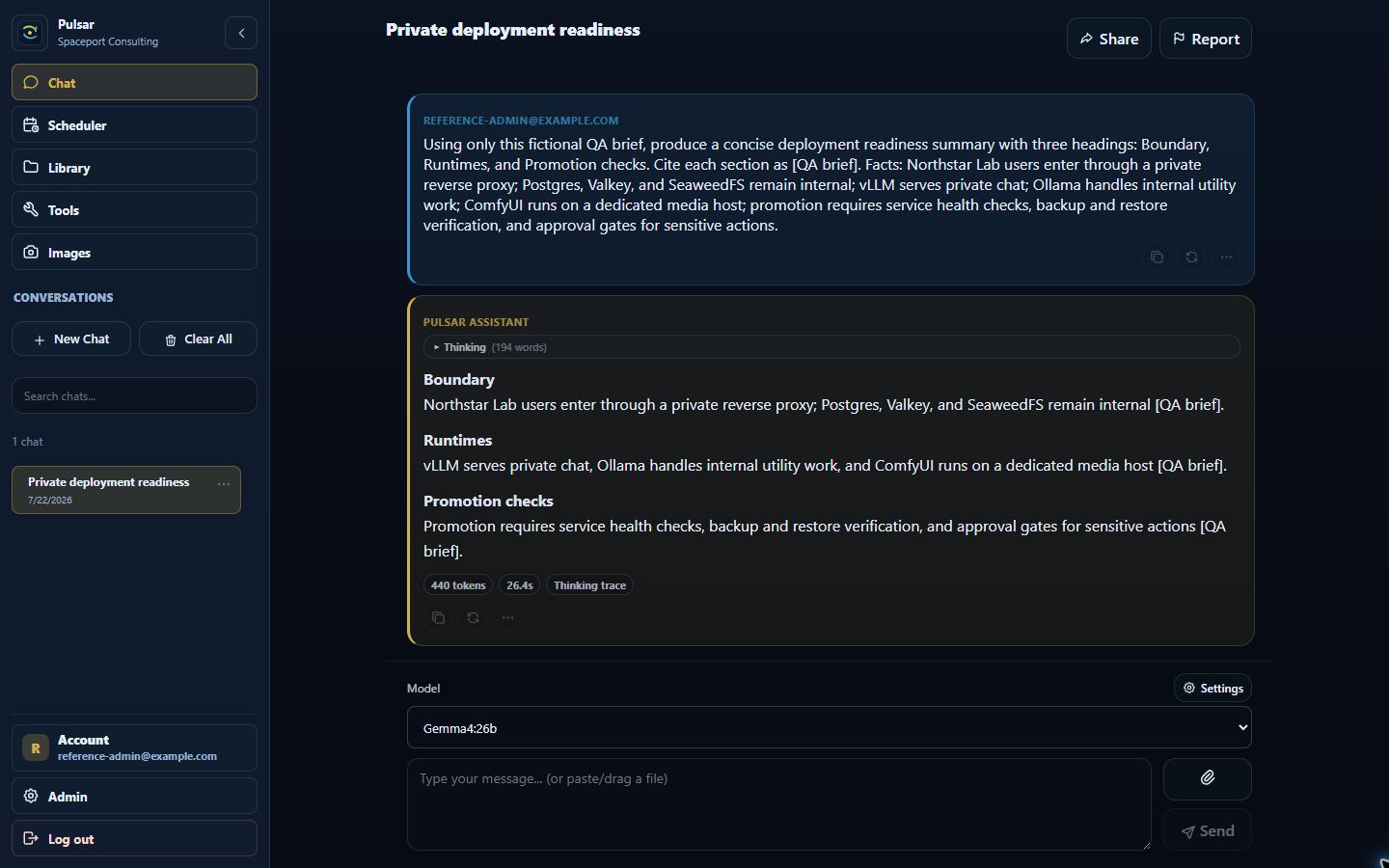
Pulsar organizes the surfaces teams actually use: conversation, scheduled tasks, generated media, repository-aware coding, assets, tools, and administration.
Run internal models, use tool-enabled answers, share read-only conversations, and preserve retrieval and metadata context.
Create one-time or recurring Chat, Pulsar Code, and monitor tasks with visible history and linked outputs.
Create, edit, inspect, and manage image and video jobs through a consistent FLUX-aware workspace.
Pick a repository, describe the goal, review evidence and the proposed patch, then approve branch and pull-request actions.
Find generated images, videos, files, Pulsar Code reports, exports, and saved answers with consistent item actions.
Monitor services, queues, logs, diagnostics, users, billing, storage, runners, and product configuration.
Runtime flexibility
Pulsar is not tied to one hosted model vendor. It can run against GPU-backed inference, desktop/lab OpenAI-compatible servers, CPU utility models, and ComfyUI media workflows.
Use vLLM as a private model runner for high-throughput GPU inference, longer context, and production OpenAI-compatible chat endpoints.
Connect LM Studio-compatible endpoints as another model runner path for local labs, smaller deployments, demos, and model testing.
Run CPU-friendly utility models for prompt optimization, chat titles, summaries, diagnostics, and safe self-healing recommendations.
Power image creation, image edit, gallery, and video workflows while admins control model assets, LoRAs, queues, and fallback behavior.
Coding agent
Pulsar Code is Pulsar's repository-aware coding workspace. The user sees a simple task thread and review surface while containers, repository policy, file evidence, diffs, checks, approvals, and diagnostics stay available underneath.

Media and assets
Pulsar brings creation, editing, galleries, video jobs, uploaded files, generated reports, and downloaded exports into a consistent workspace rather than scattering them across disconnected tools.

Images, videos, files, Pulsar Code reports, exports, and saved answers live in a single asset hub.

Enable or review capabilities like Fetch, Brave, GitHub, Image, Video, Pulsar Code, and API/MCP access.
Operations
Pulsar treats operations as a first-class product surface. Admins can see service health, queues, logs, diagnostics, storage, databases, runners, image settings, utility models, users, billing, and governance from one place.

Every major surface follows the same pattern: ask in plain language, inspect the result, and keep high-risk actions gated.
Chat, Scheduler, Images, Pulsar Code, Library, Tools, or Admin.
Use a prompt, recurring task, repository goal, media request, or operator action.
Inspect linked references, files, outputs, logs, diffs, checks, and history.
PRs, writes, destructive actions, and config changes stay explicit.
Documentation
This high-level guide maps the private repo documentation into the areas evaluators need first: install shape, runtime choices, product workflows, and release operations.
Bring up the Pulsar stack with Docker services, storage, reverse proxy routing, and health checks.
Choose how Pulsar connects to private model runners for chat, utility work, and media workflows.
Understand the core user workspace: conversations, recurring work, saved assets, and output history.
Operate the repository-aware coding agent without exposing the underlying container and policy complexity.
Configure generation and editing workflows while keeping runtime-specific controls understandable.
Run Pulsar as an operator with clear visibility into services, safety gates, and promotion readiness.
Release candidate
RC availableUse the same immutable Pulsar release on Windows 11 with WSL or native Ubuntu. Each installer verifies the candidate manifest and deployment bundle before setup begins.
Sets up Ubuntu 24.04 in WSL, the Pulsar runtime, launch shortcuts, and hardware-aware model options.
Use Windows 11 with hardware virtualization enabled, an administrator account, internet access, and enough free storage for the models you select.
$file = ".\Pulsar-Setup-68bdc46017fff4539d1decb7e48362d601b87888.ps1"
if ((Get-FileHash $file -Algorithm SHA256).Hash -ne "ABAD1DCB0CB6D5A388DCBBEA4E725703E4B7D897FBCB9B53FB56D32245A9557D") { throw "Checksum mismatch" }
Unblock-File $file
powershell.exe -NoProfile -ExecutionPolicy Bypass -File $filepowershell.exe -NoProfile -ExecutionPolicy Bypass -File ".\Pulsar-Setup-68bdc46017fff4539d1decb7e48362d601b87888.ps1" -Action ResumeThe policy bypass applies only to the installer process. It does not change the system execution policy.
Runs the interactive CPU, NVIDIA, or AMD setup and preserves install state across resume and upgrade.
Use an x86_64 Ubuntu 22.04 or 24.04 host with sudo access, internet access, and enough free storage for the models you select.
curl.cd ~/Downloads
curl -fLO "https://github.com/dbesade/pulsar-downloads/releases/download/rc-68bdc46017fff4539d1decb7e48362d601b87888/Pulsar-Setup-68bdc46017fff4539d1decb7e48362d601b87888.sh"
echo "e5b9e12303755068a421e41f72b3044acfd709398c4b188d224fba33e777348d Pulsar-Setup-68bdc46017fff4539d1decb7e48362d601b87888.sh" | sha256sum -c -
sudo bash Pulsar-Setup-68bdc46017fff4539d1decb7e48362d601b87888.shNo GitHub account or container-registry login is required. A Hugging Face token is requested only when a selected model requires acceptance or authenticated download.
Downloads and runtime images are anonymous. This RC is unsigned; verify it with SHA256SUMS.
Private deployment consultation
Tell us what needs to stay private, where your models run, and what your team wants to accomplish. The request goes directly into the Pulsar relationship workspace for structured follow-up.