
Deployment guide
Planning a Pulsar Deployment
Choose a deployment pattern, model runtime, storage profile, network boundary, and verification plan before installation.
A Pulsar deployment plan should decide five things before installation: where the application runs, where each AI runtime runs, how durable state is protected, which network paths are allowed, and how readiness will be verified. Hardware selection follows those decisions. Starting with a GPU model before defining the workload often produces a host that is expensive but still poorly matched to chat context, creative queues, storage growth, or operating responsibilities.
Pulsar supports CPU-only, AMD GPU, and NVIDIA GPU deployments. A fresh managed installation defaults to Ollama for the primary local runtime. Managed vLLM is available for suitable GPU environments that need a higher-throughput serving path. External Ollama, vLLM, and LM Studio endpoints are supported when the organization already owns runtime infrastructure. An optional utility Ollama service and optional ComfyUI service are separate runtime roles, not hidden parts of the primary chat server.
Define the workload before the host
Write a one-page workload statement before comparing infrastructure. Name the expected user group, the primary chat models, the typical prompt and attachment sizes, the acceptable number of simultaneous active turns, whether scheduled work is required, and whether the deployment must create images or video. Also state which tools and external services are allowed. This document becomes the basis for installation calibration and later capacity review.
- Users and concurrency: separate named accounts from simultaneous model requests; they are not the same capacity measure.
- Model class: record the actual model family, format, quantization, and intended context range rather than only a parameter count.
- Creative scope: distinguish chat-only, image generation, image editing, and video generation because each changes GPU and storage planning.
- Data retention: estimate conversation, upload, generated-media, log, backup, and rollback growth.
- External dependencies: list runtimes, MCP servers, repositories, retrieval destinations, identity services, and notification paths.
- Operating owner: name who controls ingress, upgrades, credentials, backups, recovery, and approval policy.
Published requirements are planning ranges
Model capacity, context length, and concurrency are calibrated during installation against available memory and the selected workload. A model publisher’s maximum context does not prove that the maximum will fit on a particular host. Review Pulsar System Requirements, then validate the real model and workload before production use.
Choose a deployment pattern
The three planning patterns describe runtime placement. They do not move the core Pulsar state services into a generic external tier. In each pattern, Next.js, FastAPI, background workers, PostgreSQL, Valkey, and SeaweedFS form the deployment-local application and state boundary. The primary, utility, or creative runtime may be managed with that deployment or reached through an approved network path.
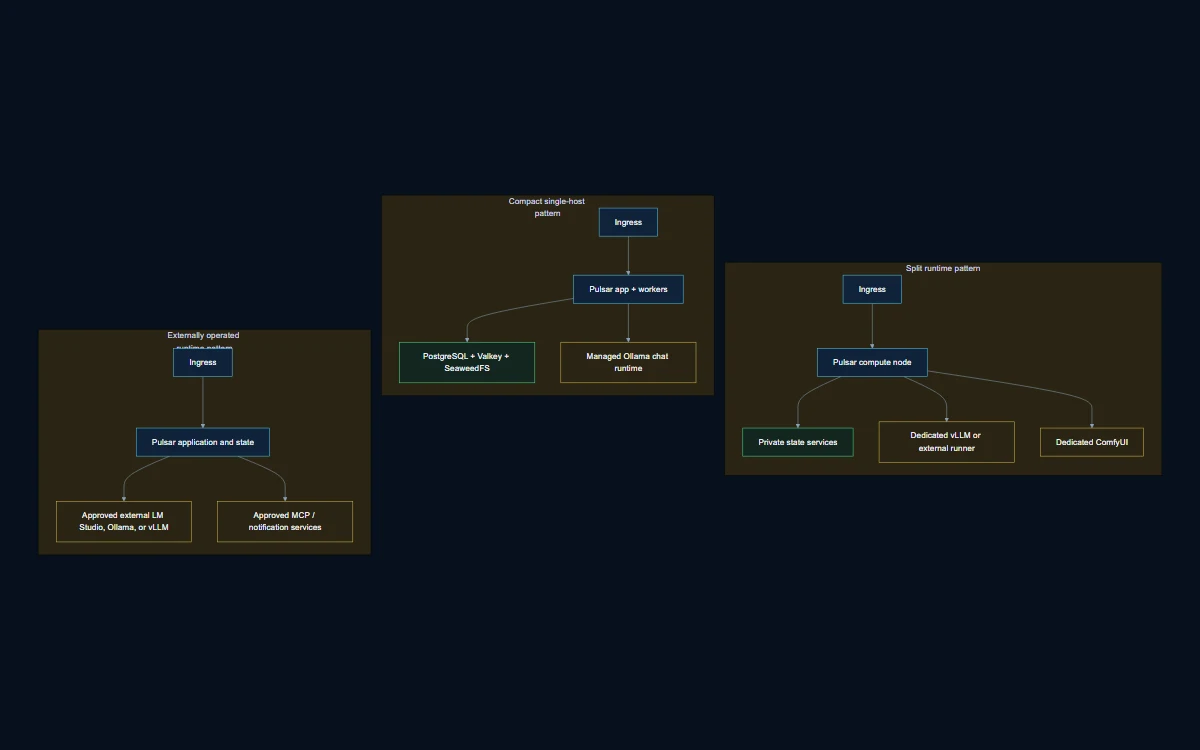
Diagram transcript
- 1. Self-contained pattern: the Pulsar application, state services, and managed primary runtime share trusted local infrastructure.
- 2. External-runtime pattern: the Pulsar application and state remain local, while primary inference uses an approved external Ollama, vLLM, or LM Studio endpoint.
- 3. Hybrid pattern: primary chat remains local or managed while a separate utility or creative runtime is placed on another approved host, or the inverse is chosen intentionally.
- 4. Every external runtime path adds network reachability, endpoint protection, credential, capacity, lifecycle, and data-transfer responsibilities.
- 5. None of the three patterns implies automatic failover, built-in transport security between hosts, or externally managed state services.
Diagram legend
Core deployment means Next.js, FastAPI, workers, PostgreSQL, Valkey, and SeaweedFS.
Primary runtime serves latency-sensitive chat.
Utility and creative runtimes are optional and independently governed.
| Pattern | Choose it when | Primary tradeoff |
|---|---|---|
| Self-contained | The organization wants a compact ownership boundary and the host can support application, state, and selected model workloads. | Simpler network dependency, but stronger local resource contention and upgrade coordination. |
| External runtime | A GPU platform or desktop runtime already exists and has an approved service owner. | Independent runtime lifecycle, but more endpoint, network, credential, and availability responsibility. |
| Hybrid | Chat, utility, and creative workloads need different hardware or operating schedules. | Better workload separation, but more paths to secure, monitor, test, and recover. |
Size CPU, memory, GPU, and storage
CPU and system memory
CPU and memory support more than inference. Application containers, PostgreSQL, Valkey, SeaweedFS, background workers, model loading, file processing, and operating headroom all consume resources. CPU-only inference also uses system memory as the principal model budget. Keep operational reserve rather than planning to consume every available gigabyte. Larger context and concurrency increase memory pressure even when the model file itself fits.
For a CPU-only host, use the requirements table as a floor and treat larger models as a memory-planning exercise. Light single-user evaluation can fit a minimum profile, while sustained work, larger local models, and multiple services benefit from the recommended core and memory range. Image and video generation should use an approved external media runner when the application host does not have suitable GPU capacity.
GPU memory and runtime reserve
GPU memory determines whether a model, its runtime overhead, active context, and useful concurrency can coexist. Preserve at least the published operational reserve instead of sizing to the model file alone. A single 24 GB NVIDIA GPU can serve a capable chat model or a creative runtime effectively, but sharing both roles requires reduced concurrency and model loading or unloading. A complete concurrent creative profile is better planned with separate GPU roles.
AMD production planning should begin with native Ubuntu and a compatible ROCm stack. Windows AMD support is preview-only, and the current managed creative package is CUDA-based. An AMD deployment that requires image or video generation should use an approved external ComfyUI service. NVIDIA deployments require a compatible driver and container GPU runtime. Validate device visibility from containers, not only from the host shell.
Storage and growth
Use SSD storage; NVMe is strongly recommended for model loading, container layers, database activity, and media workflows. Planning must include application images, chat models, utility models, the approved creative package, generated media, uploads, temporary files, backups, and upgrade rollback space. The creative model package alone is material, so a nominally large drive can become constrained after model downloads and retained output.
- Reserve separate growth estimates for PostgreSQL records and SeaweedFS object data.
- Include at least one verified backup generation and the temporary space required during restore or upgrade.
- Define retention for generated video and duplicate model files; both can dominate storage unexpectedly.
- Keep free-space alert thresholds above the point where databases, object writes, or container updates become unsafe.
Select runtime roles
| Decision | Default or supported choice | Verification question |
|---|---|---|
| Primary local chat | Managed Ollama is the new-install default. | Does the selected model fit with the target context, concurrency, and reserve? |
| Higher-throughput managed chat | Managed vLLM on suitable GPU infrastructure. | Are the driver, runtime, model format, endpoint, and memory budget supported together? |
| Existing external chat | External Ollama, vLLM, or LM Studio. | Who owns endpoint security, model lifecycle, uptime, capacity, and change notice? |
| Utility work | Optional separate utility Ollama. | Can titles, summaries, or diagnostics run without competing with primary chat? |
| Image and video | Optional ComfyUI, local or approved external. | Are queue capacity, GPU memory, model licenses, storage, and retention defined? |
Do not use the utility runtime as an unnamed fallback for primary chat. It has a separate purpose, configuration, and capacity envelope. Likewise, an external LM Studio endpoint is a supported integration path, not a managed service that Pulsar upgrades. Record every runtime owner and maintenance window in the deployment plan.
Plan state, backup, and recovery ownership
PostgreSQL is the durable application record. Valkey, an open-source Redis-compatible data store, provides queues, leases, rate limits, concurrency controls, and transient coordination. SeaweedFS stores managed object data for features that use object storage; it is not the destination for every export. The deployment plan should name the backup, retention, and restoration procedure for each service and the consistency relationship between database rows and object references.
A backup is not complete because an archive command returned success. Define where backups are stored, who can read them, how checksums are verified, how many generations are retained, and how a restoration exercise proves application-level consistency. Pulsar documentation does not claim that backups are encrypted automatically. Encryption at rest, off-host protection, immutability, and key management must be selected and verified by the operator.
Define network and security responsibilities
The organization owns public ingress, TLS, DNS, firewalling, and upstream exposure policy. Keep PostgreSQL, Valkey, and SeaweedFS on private deployment networks. External runtimes and tools should be reachable only through approved paths. Record whether each path is local, private-routed, VPN-protected, or otherwise controlled; do not infer built-in mTLS or automatic network isolation from the application configuration.
- Document inbound users and administration paths separately from outbound model and tool destinations.
- Use least-privilege credentials for external runtimes, repositories, MCP servers, and object access.
- Confirm outbound HTTPS access needed for initial container and model downloads, then reduce egress according to operating policy.
- Record model licenses and any required authentication or license acknowledgement before automated installation.
- Decide where secrets are stored, how they rotate, and which diagnostic views redact them.
Run installation preflight
Preflight should fail early when the selected profile cannot work. Verify the supported server operating system, architecture, logical cores, memory, free storage, container runtime, outbound access, and time synchronization. For NVIDIA, verify the driver and container GPU runtime. For AMD, verify the GPU, driver, ROCm userspace, and container access. For external endpoints, test name resolution, routing, credentials, compatible APIs, model discovery, and streaming from the Pulsar host.
Capture the intended configuration before applying it: runtime type, endpoint, model, context target, utility-runtime choice, creative-runtime choice, storage paths, published ports, and accepted external-runtime terms. This record makes later drift visible and gives reviewers a stable basis for approving the deployment.
Verify before production use
- Confirm application liveness, readiness, and dependency health from the intended network location.
- Create a user, start a chat, verify streaming, reload the conversation, and confirm durable history.
- Exercise the selected model with representative prompt length, attachments, and simultaneous users.
- Submit each enabled background workflow and inspect queued, running, completed, failed, and recovery states.
- Upload and retrieve managed object data, then verify retention and deletion policy.
- Test external tools only with approved destinations and review the resulting audit evidence.
- Create a backup, verify checksums, and perform a restoration exercise in an isolated environment.
- Record observed memory, GPU reserve, storage growth, error behavior, and limitations as the initial capacity baseline.
Common deployment failure modes
| Failure mode | Why it happens | Planning correction |
|---|---|---|
| Model file fits but requests fail | Runtime overhead, context, cache, concurrency, or reserve was omitted. | Validate the real workload and reduce model, context, or concurrency before removing reserve. |
| Chat works but creative jobs stall | Primary and creative models compete for one GPU or storage is constrained. | Separate runtime roles, schedule loading deliberately, or use an external creative host. |
| External runtime is reachable but unusable | Authentication, model naming, streaming compatibility, or policy differs. | Test the complete request path from Pulsar, not only a network port. |
| Backups exist but cannot restore | Database and object data were not coordinated or restoration was never tested. | Create a documented, checksummed, application-level restoration exercise. |
| Upgrade runs out of disk | Rollback images, models, temporary data, and backups were excluded from sizing. | Reserve upgrade headroom and enforce free-space gates before change. |
Common deployment questions
Which runtime should a new local installation use?
Managed Ollama is the new-install default. Choose managed vLLM when suitable GPU infrastructure and workload justify the higher-throughput serving path. Use an external runtime when another team or system already owns that endpoint and its controls.
Can Pulsar run without a GPU?
Yes. CPU-only deployments support lighter local chat workloads when system memory is sufficient. Creative generation should use an approved external media runtime when local GPU capability is absent.
Does an external runtime move Pulsar data services off host?
No. External-runtime and split-compute patterns describe AI runtime placement. PostgreSQL, Valkey, and SeaweedFS remain with the Pulsar application deployment unless a separate architecture is designed and reviewed.
What proves the host is large enough?
Installation checks establish a minimum technical fit. Representative workload testing establishes whether context, concurrency, latency, GPU reserve, and storage growth are acceptable for the organization. Published specifications alone do not prove capacity.
Next decision
Turn the approved deployment plan into an operating model with Operating a Private AI Workspace. Define who reviews health, who can run recovery actions, how backups are tested, and what evidence is required before change.
Private deployment consultation
Review Pulsar against your environment.
Bring the infrastructure, security boundaries, model runners, and use cases. The Pulsar team will map the appropriate deployment path.