
Operations guide
Operating a Private AI Workspace
Build an operating routine around health checks, logs, queues, backups, controlled recovery, approvals, and evidence.
Operating Pulsar means keeping durable state recoverable, request paths observable, runtime capacity known, and high-risk actions explicit. The product provides health endpoints, administrative visibility, redacted diagnostic analysis, audit records, and a narrow set of safe recovery actions. These facilities support an operator; they do not create an autonomous remediation system or replace an organization’s incident, backup, access-control, and change-management procedures.
A useful operating model separates four questions. Is the application process alive? Is it ready to serve the application paths represented by readiness? Are the dependencies that the dependency endpoint actually checks available? Is the user-facing workflow healthy under a representative request? The endpoints help answer the first three, but only a synthetic or real workflow answers the fourth. Treat a green status as bounded evidence, not proof that every runtime, tool, queue, and object path is functioning.
Assign operating ownership
Before production use, assign an owner for application health, state services, model runtimes, ingress, identity, external tools, backups, and release changes. The same person may own several areas in a small environment, but the responsibilities should still be named. An incident is harder to recover when a remote GPU endpoint, object backup, or repository credential has no clear owner.
| Responsibility | Minimum operating record | Decision owner |
|---|---|---|
| Application and workers | Version, deployment time, expected services, health paths, logs, and restart procedure. | Pulsar platform operator |
| PostgreSQL | Backup schedule, checksum verification, retention, restore procedure, and capacity threshold. | State-service owner |
| Valkey | Persistence configuration, queue and lease impact, backup treatment, and workflow-specific recovery steps. | Coordination-service owner |
| SeaweedFS | Object retention, free-space thresholds, backup consistency, and restore verification. | Object-data owner |
| AI runtimes | Endpoint, model, owner, maintenance window, capacity baseline, and escalation path. | Runtime owner |
| Ingress and integrations | Exposure policy, TLS, credentials, destinations, rotation, and failure behavior. | Network or integration owner |
Interpret the health endpoints correctly
/health/live answers whether the application process is alive
Use /health/live for process liveness. A successful response means the FastAPI process can answer the liveness route. It does not prove that PostgreSQL, Valkey, an MCP server, SeaweedFS, a model runtime, a worker, or an external tool is available. A liveness probe should not be promoted into a complete service-health claim.
/health/ready represents bounded application readiness
Use /health/ready to determine whether the application reports itself ready for the readiness conditions implemented by the release. Readiness primarily represents application and MCP readiness. It is appropriate for deployment routing and release checks only when operators understand that scope. It is not a comprehensive synthetic test of every configured model, media, repository, scheduler, storage, or notification workflow.
/health/dependencies reports selected dependencies
Use /health/dependencies for direct checks of PostgreSQL, the Valkey compatibility client, and MCP dependency state represented by that endpoint. The response does not directly validate every primary or utility runtime, SeaweedFS path, ComfyUI workflow, external tool, or background queue outcome. Add workflow-level checks for services that matter to the deployment.
| Signal | What it supports | What it does not prove |
|---|---|---|
| /health/live | FastAPI process can answer a liveness request. | Dependency, runtime, worker, storage, or workflow health. |
| /health/ready | Implemented application and MCP readiness conditions are satisfied. | Every enabled capability can complete a representative task. |
| /health/dependencies | Selected direct dependency checks, including PostgreSQL and Valkey compatibility access. | SeaweedFS, all AI runtimes, ComfyUI, tools, or end-to-end user success. |
| Synthetic workflow | A chosen user path works with current policy, state, runtime, and dependencies. | Other workflows, future capacity, or high availability. |
Use layered readiness
Combine process health, bounded dependency checks, and a small set of representative workflows. For example, verify a streamed chat against the selected primary model, one managed-object upload and retrieval, and one enabled background workflow. Keep those checks low-impact and separate from destructive recovery.
Observe application, state, queues, and runtimes
Start with a known-good service inventory. The expected set normally includes the frontend, FastAPI backend, ARQ worker, PostgreSQL, Valkey, SeaweedFS, and any managed runtime enabled for the deployment. Optional utility, ComfyUI, Pulsar Code, and sidecar services should appear only when configured. A missing optional service and an unexpectedly enabled service are both review findings.
- Application: request errors, authentication failures, streaming completion, worker availability, and current release version.
- PostgreSQL: connectivity, storage growth, backup status, long-running work, and application-level consistency.
- Valkey: service health, queue backlog, lease or rate-limit symptoms, and memory or persistence pressure appropriate to the configuration.
- SeaweedFS: object access, free storage, failed writes, retention behavior, and consistency with PostgreSQL references.
- Runtimes: endpoint reachability, loaded model, request errors, time to first usable output, memory reserve, and owner-reported maintenance.
- External tools: destination health, authentication, policy denials, rate limits, and data-transfer expectations.
Logs should be collected with timestamps and service identity, but diagnostic access must remain controlled. Redact credentials, tokens, private addresses, user content, and unnecessary identifiers before evidence leaves the deployment boundary. An analysis model can help summarize selected logs after redaction; it should not receive unrestricted raw logs or become the authority that executes a repair.
Use the controlled recovery loop
Pulsar operations follow an evidence-first loop: select bounded health and log evidence, redact it, analyze it, persist an insight, preview an allowlisted action, let an operator run that action, record the cooldown and audit result, then recheck health. The loop is intentionally operator-triggered. A recommendation does not grant execution authority, and a successful command does not prove that the original workflow recovered until it is tested again.
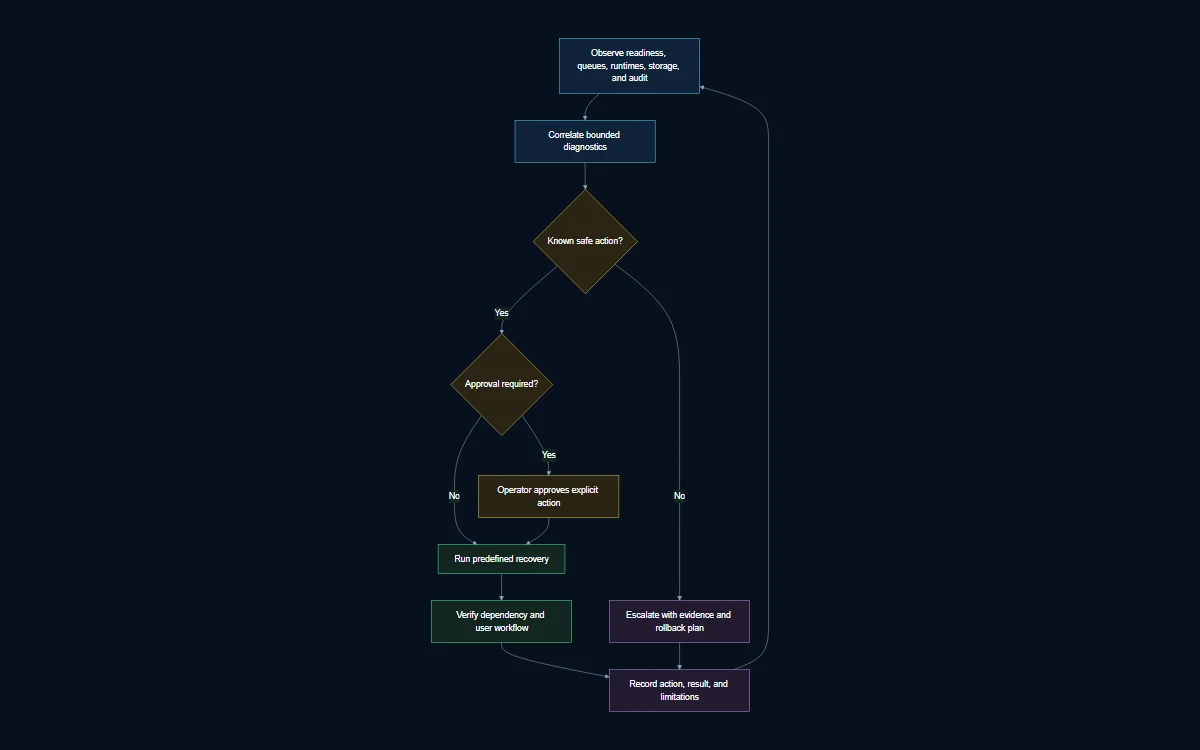
Diagram transcript
- 1. The operator selects a service, health result, incident window, and minimum necessary logs.
- 2. Sensitive values and unnecessary user data are redacted before analysis.
- 3. The utility analysis path summarizes evidence and records a bounded operational insight.
- 4. Pulsar shows an allowlisted action in dry-run form, including eligibility and expected scope.
- 5. The operator reviews and starts the action; analysis alone cannot execute it.
- 6. Pulsar records the action, outcome, audit context, and ten-minute cooldown.
- 7. The operator reruns health and a representative workflow, then closes or escalates the incident.
Diagram legend
Evidence stage: selection, redaction, analysis, and persisted insight.
Control stage: dry run, eligibility check, and explicit operator action.
Verification stage: audit record, cooldown, health recheck, and workflow confirmation.
Know the exact safe-action boundary
The reviewed release has only three actions in the safe automated-action class. They remain operator-triggered even though their implementation is bounded. Each safe action has eligibility checks, an audit record, and a ten-minute cooldown that prevents immediate repetition. Do not describe these controls as autonomous self-healing.
- Runtime or model cache refresh: refresh eligible cached runtime or model state without changing the selected deployment configuration.
- Stale-media quarantine: move eligible stale media jobs into a quarantined state for review rather than silently replaying or deleting them.
- Stuck-scheduler closure: close eligible stale scheduler runs into the implemented terminal failure state so operators can inspect and reschedule deliberately.
The ten-minute cooldown is a control, not a recovery objective. It limits repeated execution of a safe action; it does not state that the service will recover within ten minutes. If a check remains unhealthy, preserve the evidence and escalate according to the service owner’s runbook rather than repeatedly searching for another action.
Actions that require explicit approval
Service restarts, queue clearing, configuration changes, credential changes, data deletion, broad replay, model replacement, and repository publication are outside the safe-action allowlist. They can interrupt users, discard coordination, alter durable state, broaden access, or publish external changes. Require a named reason, defined scope, rollback or recovery plan, and the approval appropriate to the environment.
| Action class | Execution rule | Required follow-up |
|---|---|---|
| Three safe actions | Operator starts an eligible allowlisted action; ten-minute cooldown applies. | Recheck the affected health signal and representative workflow. |
| Restart or infrastructure change | Use the organization’s approved change or incident procedure. | Confirm durable state, in-flight work, queue behavior, and full service inventory. |
| Data or queue mutation | Require explicit impact review and a recovery path before action. | Reconcile PostgreSQL records, Valkey coordination, and object references as applicable. |
| Repository publication | Use the exact Pulsar Code branch-push and draft-PR approvals when that workflow is enabled. | Inspect durable receipts and repository state; merge remains outside the action. |
Respond to incidents with durable evidence
Begin by defining impact in user terms: chat cannot start, streaming stops, media jobs remain pending, scheduled work is stale, files cannot be retrieved, or an external tool is unavailable. Record the first observed time, affected workflow, release version, configuration class, and recent approved changes. Avoid collecting broad data before the problem boundary is understood.
- Confirm process liveness, bounded readiness, selected dependencies, and the expected service inventory.
- Run one low-impact representative request for the affected workflow and preserve the result.
- Inspect the durable PostgreSQL record before changing queue, worker, or object state.
- Collect the minimum relevant service logs and redact secrets, private infrastructure, and unnecessary user content.
- Preview an eligible safe action or prepare an explicitly approved change with impact and rollback steps.
- Execute once, respect cooldowns, and avoid concurrent operators applying overlapping repairs.
- Recheck health, the affected workflow, durable records, and dependent services before closing the incident.
- Document the limitation or corrective action that should enter the next release or runbook update.
A queue symptom is not always a queue problem. A worker may be blocked by PostgreSQL, object storage, a model runtime, or an external service. A chat failure is not an ARQ backlog because chat never uses ARQ. Diagnose from the documented request path so the repair targets the owning component.
Back up and restore as one application
A Pulsar recovery set includes PostgreSQL, Valkey according to its persistence configuration, SeaweedFS managed objects, deployment configuration, and checksums or manifests needed to verify the set. PostgreSQL and SeaweedFS must be considered together because durable rows can reference objects. Configuration is necessary to reconstruct runtime and service placement. Valkey treatment depends on which queued or leased workflows must survive and how those workflows reconcile with durable records.
Store backup generations outside the failure domain they protect and limit access according to the data they contain. The reviewed product evidence supports backup and verification procedures but does not establish automatic encryption. If encrypted backup storage, immutable retention, or managed keys are required, add and test those infrastructure controls explicitly.
- Verify archive creation and checksums on every scheduled backup.
- Monitor backup age, duration, size, failures, and destination capacity.
- Perform restoration in an isolated environment on a defined schedule.
- Check users, conversations, representative object-backed items, queued-work reconciliation, and configuration after restore.
- Record actual restoration time as local evidence, not as a universal Pulsar recovery guarantee.
Operate upgrades as controlled changes
Before upgrade, record the running version, configuration, enabled profiles, runtime endpoints, free storage, backup status, and known limitations. Review release notes and migration steps against the environment. Preserve sufficient space for new images, models, temporary files, and rollback artifacts. Freeze unrelated configuration so a failed release has a bounded cause.
After upgrade, verify the expected service inventory, all three health endpoints, selected runtime model, streamed chat, one object-backed workflow, one enabled background workflow, administrative access, analytics or audit behavior, and backup execution. Do not call the change complete because containers started. User paths and durable state are the acceptance criteria.
Establish a routine review cadence
| Cadence | Review |
|---|---|
| Each shift or operating day | Health, failed user workflows, stale background work, storage pressure, runtime availability, and security-relevant alerts. |
| Weekly | Backup verification, queue trends, model and GPU reserve, external integration failures, expired credentials, and pending approvals. |
| Monthly | Restoration exercise status, retention growth, user and role review, dependency updates, runbook accuracy, and limitations. |
| Before and after change | Versioned configuration, evidence snapshot, rollback readiness, representative workflows, and durable-state consistency. |
Pulsar does not currently provide a complete persistent SLO and error-budget system. If the organization operates against service objectives, collect the required availability, latency, error, and saturation signals in its monitoring platform and define ownership there. Do not convert a dashboard snapshot into an availability guarantee.
Common operations questions
Does a green readiness check mean every feature works?
No. Readiness represents the conditions implemented by that endpoint, primarily application and MCP readiness. Use representative checks for chat, object storage, creative work, repositories, or other enabled workflows.
Is Pulsar self-healing?
Pulsar provides operator-triggered, allowlisted recovery actions for runtime or model cache refresh, stale-media quarantine, and stuck-scheduler closure. Calling this autonomous self-healing would overstate the implementation.
Can an operator clear a queue as a safe action?
No. Queue clearing can discard coordination or hide durable-work inconsistencies. It requires explicit impact review, approval, and workflow-specific reconciliation.
Are Pulsar backups encrypted automatically?
The reviewed evidence does not establish automatic backup encryption. Select, configure, and test encryption and key management in the backup destination when required.
Does Pulsar provide high availability or a recovery-time guarantee?
No such guarantee is established by the reviewed bundled topology. Redundancy, failover, recovery objectives, and restoration time depend on deployment-specific infrastructure and tested procedures.
Connect operations to architecture
Use Pulsar Architecture to identify the owning component before recovery. Use Split Compute and GPU Runtimes when an external GPU service changes the failure boundary. Use Security to align operating access and external integrations with policy.
Private deployment consultation
Review Pulsar against your environment.
Bring the infrastructure, security boundaries, model runners, and use cases. The Pulsar team will map the appropriate deployment path.